

In today’s dynamic digital landscape, safeguarding your WordPress website is crucial. DS Digital Media, recognized as WordPress security expert, offers a comprehensive 20-Point WordPress Security Checkup to fortify your online presence. This thorough checkup, led by our adept team, goes beyond conventional measures, addressing key checkpoints to significantly enhance your WordPress security and stability.
DSDM Security Plugin
Contact us for download and licensing information.
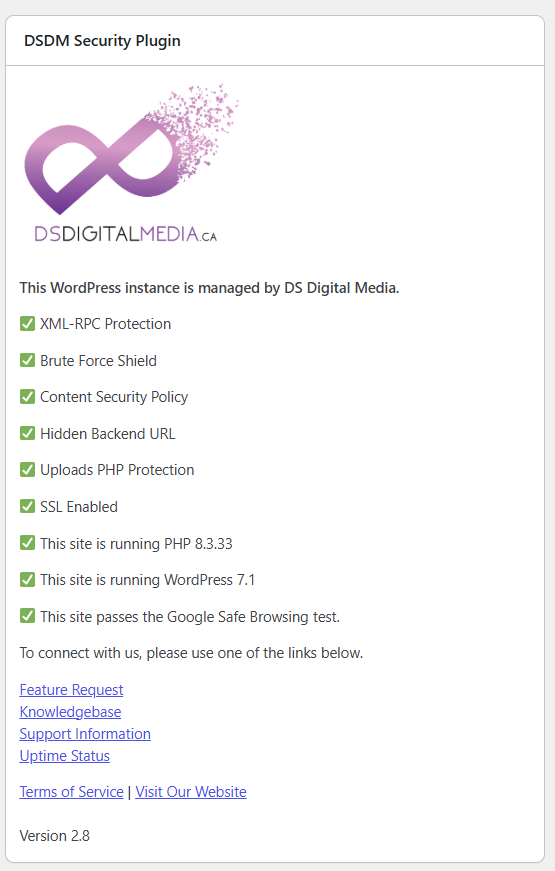
The DSDM WordPress Security Plugin provides centralized website protection, administrative hardening, and security monitoring for WordPress websites. Its built-in dashboard widget gives administrators an at-a-glance view of important security settings, software versions, SSL status, licensing, and Google Safe Browsing results.
The plugin helps reduce common WordPress attack surfaces with brute-force login protection, a customizable hidden login URL, XML-RPC protection, PHP execution blocking inside the uploads directory, WordPress version hiding, and optional IP-based access restrictions for the WordPress admin area.
Configurable Content Security Policy rules and additional HTTP security headers help protect visitors against cross-site scripting, clickjacking, MIME-type attacks, unauthorized resource loading, and other browser-based threats. The plugin also hardens WordPress administration by restricting file modifications, concealing sensitive management features from non-development users, and managing security-focused plugin updates.
Key Features
- WordPress security dashboard with clear enabled and disabled status indicators
- WordPress, PHP, SSL, and plugin version monitoring
- WordPress version hiding in HTML, RSS feeds, scripts, and stylesheets
- Brute-force login protection with automatic IP blocking
- Custom hidden WordPress login and backend URL
- WordPress admin access restrictions using IPv4, IPv6, or CIDR allow lists
- PHP execution blocking inside wp-content/uploads
- Optional XML-RPC authentication protection
- Configurable Content Security Policy headers
- Cryptographic CSP nonces for scripts, styles, and linked resources
- Optional compatibility mode for inline scripts and styles
- HTTP Strict Transport Security
- Automatic HTTPS redirection
- Clickjacking protection with X-Frame-Options
- MIME-sniffing protection with X-Content-Type-Options
- Referrer and browser permissions policies
- Server signature suppression and directory listing protection
- Google Safe Browsing security checks with email threat notifications
- WordPress admin and plugin management hardening
- File editor and file modification restrictions
20 Point Checkup
Current and Stable WordPress and/or PHP Versions
Keep your WordPress installation and PHP version up to date to leverage the latest security patches and enhancements.
Web Application Firewall (WAF)
Enable WAF and limit port scans to only essential ports (80 and 443) to thwart malicious activities.WordPress Plugin Updates.
Automatically Log Out Idle Users
Implement automatic logout mechanisms to terminate inactive user sessions. This helps prevent unauthorized access and enhances overall security.
Malware Scanning & Protection
Implement robust malware scanning mechanisms to detect and eliminate potential threats.
Blacklist Checks
Regularly check and mitigate any blacklisting issues that could affect your website’s reputation.
HTTP Security Policies
Implement Referrer and Permissions policies to control HTTP security aspects effectively.
Login Security
Ensure a secure login environment with unique admin usernames, customized login URLs, Google reCaptcha, 2FA, and strong password policies.
Filesystem/Backend Security
Detect file changes, update WordPress salts, and employ brute force detection mechanisms.
Additional Backend Measures
Disable file editing, XML-RPC, and consider changing the WordPress database prefix for added security.
Brute Force Prevention
Implement measures to prevent brute force attacks on your WordPress site.
SSL Tests
Conduct thorough SSL tests to guarantee the encryption strength of your website.
Uptime Monitor
Regularly monitor website uptime to identify and address any potential downtime issues promptly.
Scheduled Backups
Establish a reliable backup system to ensure quick recovery in the event of data loss or security incidents.
Web Security Headers
Configure essential security headers such as X-Frame-Options, X-Content-Type, Strict-Transport-Security, and Content Security Policy.
HTTP2 Test
Verify the compatibility, performance and security benefits of HTTP2 on your WordPress site.
Review Visible Files and Directories
Regularly review and secure visible files and directories to prevent unauthorized access.
Check for Suspicious Scripts
Scan your website for any suspicious scripts that may compromise its integrity.
Google Safe Browsing Test
Pass the Google Safe Browsing test to ensure your website’s reputation and user safety.
403 Authorization for WordPress Admin and Login Pages
Implement an additional layer of security by password-protecting your WordPress admin and login pages at the web server level.
By addressing each of these 20 checkpoints, you will achieve a robust defense against potential threats and ensure a safe and trustworthy online experience for your visitors.
For more information or to book your 20 point checkup, please complete the following form or contact us.
Did you know? It only takes 10 minutes to crack a lowercase password that is 6 characters long.
WE DESIGN & DEVELOP DIGITAL MEDIA SOLUTIONS
We offer both custom and Wordpress development for your business, including e-commerce and advanced content management solutions.
Web Development

Our award winning web design allows your web site to captivate and communicate effectively with your target markets.
Web Design
Keeping your web site and related services up-to-date and constantly monitoring system uptime is a cornerstone of our business. We offer a range of web security solutions.
Web Security

DS Digital Media offers personalized and scalable Search Engine Optimization (SEO) and Search Engine Marketing (SEM) packages for our clients. Our proprietary methodology combined with advanced analytics ensures you web site is seen.
Online Marketing & SEO

We offer a range of secure web hosting solutions. Having web design, development and hosting under one roof ensures the stability of your web site and accountability from our team.
Web Hosting

To support our content writing and marketing initiatives, we can provide professional 4K, HD video and photography for our clients, with our partner LIFE LONG FILMS.
HD VIDEO & PHOTOGRAPHY